
Quick answer: For layer-based retouching without a subscription, Affinity is the free pick, and as of 2 November 2026 it runs on iPad as well as Windows and Mac. For RAW development and library work, darktable 5.6.2 is the free pick; Adobe’s Photography plan still makes sense if you want Lightroom Classic and Photoshop in one sync-everywhere bundle.
What changed this week
PetaPixel reports that Canva released an all-new Affinity for iPad app, with RAW editing and a free price tag for individuals. Its AI features need a Canva premium subscription.
Google is rolling out Snapseed 4.2 on Android and iOS, and Digital Trends calls preset and LUT import the headline feature. Darktable published its 5.6.2 bug-fix build on 4 October 2026, and Fstoppers covered Luminar 1.29.0 on 2 November 2026.
None of these replaces Adobe for everyone. They do cover more of a typical enthusiast’s week than they did a year ago, so the useful question is which gap each one fills.
The options side by side
The table lists what each vendor or named outlet states as of 3 November 2026. Prices are US dollars.
| Tool | Platforms | Price (USD per month) | Core strength | Best for |
|---|---|---|---|---|
| Affinity (Canva) | Windows, macOS, iPadOS 18.0+ | 0 (free Canva account needed) | Layers, retouching, RAW, vector and layout in one file | Photoshop-style compositing on a budget |
| darktable 5.6.2 | Windows, macOS, Linux AppImage | 0 (open source) | Non-destructive RAW development plus library | Lightroom-style batch work without a subscription |
| Snapseed 4.2 | Android, iOS | 0 | Quick phone edits, preset and LUT import | Applying a desktop look to phone shots |
| Luminar 1.29.0 | Desktop, with a mobile companion | Licence or pass (see Skylum) | AI-guided edits, depth-aware fog | Fast stylised edits, beginners |
| Adobe Photography plan (1TB) | Desktop, iPad, mobile, web | 19.99 (annual commitment, per trackers) | Lightroom, Lightroom Classic and Photoshop together | Mixed catalogue and compositing workflows |
Affinity: the free Photoshop stand-in
Affinity is one app that Notebookcheck says replaces Affinity Photo, Designer and Publisher. The desktop version arrived roughly a year ago, according to CG Channel, and the iPad edition needs iPadOS 18.0 or later plus a Canva account.
One file format covers sketch, vector, photo and layout work, so a retouched photo can sit in a brochure without leaving the document. Yahoo Tech’s coverage notes the iPad app includes Affinity’s RAW editing.
Moving from Photoshop is the main friction. Basic Tutorials relays Canva’s statement that PSD import keeps groups, adjustment layers and smart objects, while some Photoshop-specific features may be simplified or rasterised. Test a few of your heavier files before you cancel anything.
On privacy, Affinity’s own iPad page says content edited in Affinity isn’t used to train AI features. Canva AI Studio is available with a premium Canva plan, and the core app stays free.
darktable: the free RAW workflow
Darktable is an open-source RAW developer, and Wikipedia’s entry describes its non-destructive editing and its two main modes, lighttable for the library and darkroom for editing. Release builds on the project’s own posts include an AppImage, macOS .dmg files and a Windows .exe, and the 5.6.1 post lists them.
Version 5.6.0 arrived on 21 June 2026. According to Let’s Data Science, citing the release notes, it added an optional AI subsystem (built with -DUSE_AI=ON) with object masking and a neural restore module. Since it’s a compile-time option, check whether your distribution’s build includes it.
The trade-off is learning time. Darktable gives you control over the whole processing pipeline, which is why people who like Lightroom’s sliders can find it dense at first.
Snapseed 4.2 and the preset question
If you sell or share Lightroom presets, Snapseed 4.2 is now a cheap place to try them on phone shots. Per Droid Life’s changelog, imports go through Manage Looks in the gallery menu, and you can share your own Looks with the LUTs they use.
The sources list the accepted formats slightly differently. Droid Life names .cube, .xmp, .3dl, .png and .snapseed files, while Android Pure reports the Google Play listing as .xmp presets, .cube and .png LUTs, QR Looks and .zip packs.
How to import a preset or LUT in Snapseed 4.2
- Update Snapseed from Google Play or the App Store to version 4.2.
- Open the gallery menu and tap Manage Looks.
- Import your preset or LUT file in a supported format.
- If the option is missing on 4.2, wait. Android Authority reports that LUT support appears to arrive through a server-side switch.
Which Lightroom sliders survive the trip isn’t described in the changelogs, so judge a preset by eye. Snapseed 4.2 also adds multi-wheel colour grading, per Android Police, which gives imported looks something to be tuned with.
Going the other way, Adobe’s own preset tutorial shows the cloud Lightroom route: open the Presets panel in the Editing workspace, click the … icon, choose Import Presets and pick .xmp, .lrtemplate or .zip files. Old .lrtemplate files are converted to .xmp automatically.
What Adobe’s plans cost, and what they include
Adobe’s help page says the Photography (1TB) plan covers Photoshop on desktop, iPad and web, Lightroom on desktop, mobile and web, and Lightroom Classic. The same page also lists a 20GB tier, though AI Test Guide reports it was phased out for new subscribers, so confirm what’s offered in your region.
Prices below come from trackers that read Adobe’s US pages; the Dupple guide cites a read on 10 October 2026. Photutorial puts the Photography plan at $19.99 per month on an annual commitment, and ProDesignTools lists the Lightroom-only plan at $11.99 and single-app Photoshop at $22.99. Photutorial’s Photoshop pricing page lists Creative Cloud Pro at $69.99. All are US dollars per month as of 3 November 2026 and can change.
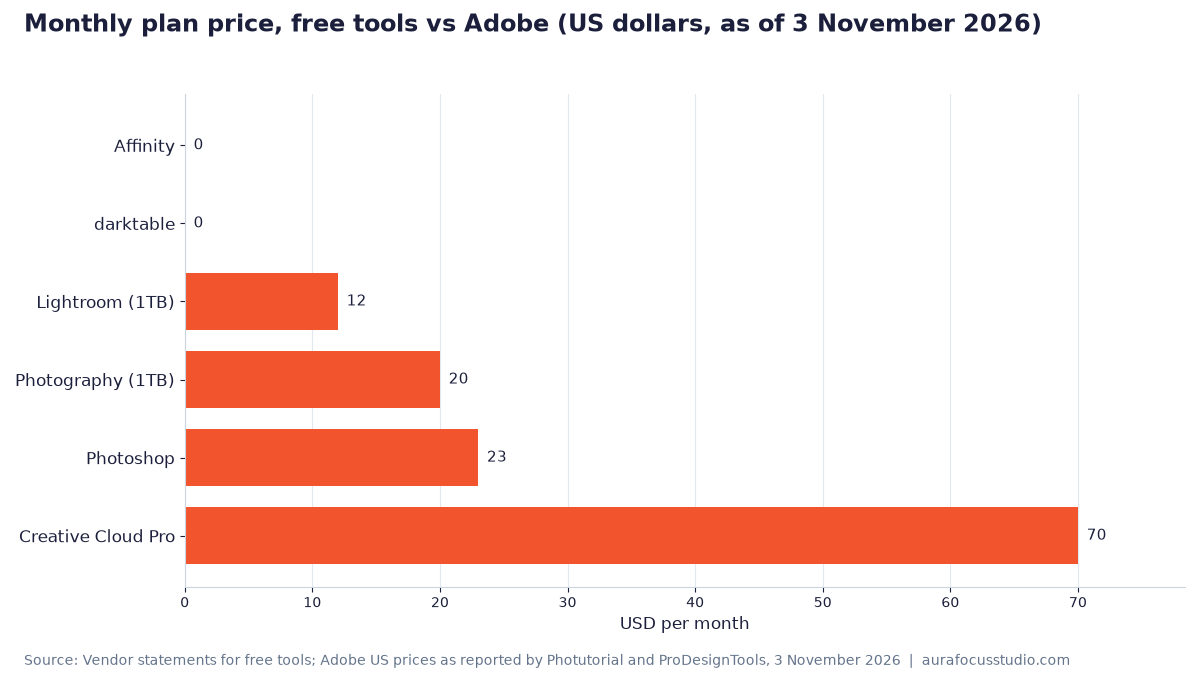
Source: Vendor statements for free tools; Adobe US prices as reported by Photutorial and ProDesignTools, 3 November 2026
Our calculation: the Photography plan at $19.99 against Photoshop alone at $22.99 is a difference of $22.99 − $19.99 = $3.00 per month, or $3.00 ÷ $22.99 = 13% cheaper, while adding Lightroom. Over a year on the annual commitment, 12 × $19.99 = $239.88.
The free tools cost $0 in licence fees, but they don’t give you Adobe’s cloud sync between Lightroom Classic, Lightroom and Photoshop. If a client sends PSDs with live smart objects, that sync and file compatibility are worth the $19.99.
Luminar 1.29.0 for quick stylised edits
Luminar 1.29.0 is a paid app with a free update for current owners, and Fstoppers says the update should appear automatically or via Check for Updates in the Luminar menu. Fstoppers summarises it as AI cropping, a depth-aware fog tool and a better Enhance, calling the fog tool the standout and the AI Assistant suited to beginners.
A German-language blog, Tuxoche, adds that you can now print directly from Luminar and that edits sync with the Luminar mobile app. Check Skylum’s site for current licence options, as the company runs seasonal offers.
What this means for you
Best for retouching and compositing on a zero budget: Affinity, on desktop or iPad.
Best for a large RAW archive without a subscription: darktable 5.6.2. Budget time for the learning curve, and expect to rebuild Lightroom presets by hand.
Best for carrying a desktop look onto phone shots: Snapseed 4.2, if the Manage Looks import has reached your device. Start with .cube LUTs, which both format lists above include.
Best for Lightroom Classic plus Photoshop with cloud sync: Adobe’s Photography plan at $19.99 per month (as of 3 November 2026, per Photutorial). It’s cheaper than Photoshop alone, so take the single-app plan only if you don’t want Lightroom.
Best for fast, guided stylised edits and owners who skip subscriptions: Luminar 1.29.0, once you’ve checked Skylum’s current licence terms.
Sources
- PetaPixel: All-New Free Affinity App Brings Photo Editing, Sketching, and Vectors to iPad
- Notebookcheck: Free Affinity app now takes on Photoshop, Illustrator and InDesign on the Apple iPad too
- CG Channel: Free tool: Canva launches Affinity for iPad
- Yahoo Tech: iPad users finally have the free Adobe alternative they’ve been asking for
- Basic Tutorials: Affinity for iPad: Free Photoshop Alternative Is Here
- Affinity: All in one iPad app
- darktable: darktable 5.6.2 released
- darktable: darktable 5.6.1 released
- darktable: darktable 5.6.0 released
- Let’s Data Science: Darktable Releases 5.6 With Optional AI Tools
- Wikipedia: Darktable
- Digital Trends: Snapseed 4.2 is making it easier to import Lightroom presets and customise photos
- Droid Life: Snapseed 4.2 Rolling Out: LUT Imports, Motion Blur, and More
- Android Pure: Snapseed 4.2 Brings LUT Imports and Motion Blur to Android and iPhone
- Android Authority: Latest Snapseed update gives you a few more reasons to skip Lightroom
- Android Police: Google’s free Snapseed app just got pro-level blur and color grading tools
- Adobe: Import presets (Lightroom tutorial)
- Adobe Help: Creative Cloud Photography plans
- Photutorial: What is Adobe Photography plan?
- Photutorial: How much does Photoshop cost?
- ProDesignTools: What’s the Difference Between the Photography, Photoshop and Lightroom Plans?
- Dupple: How Much Does Photoshop Cost in 2026?
- AI Test Guide: Adobe Photoshop Pricing 2026
- Fstoppers: The Luminar Fall Update Has Some Powerful New Tools
- Tuxoche: Autumn update from Skylum Luminar 1.29
Header image: illustration, AI-generated.